
Build and Kill Zombies How to Redeem Codes
Open Exclusive Shop, type the string once, and watch the bill counter — not the coin icon.
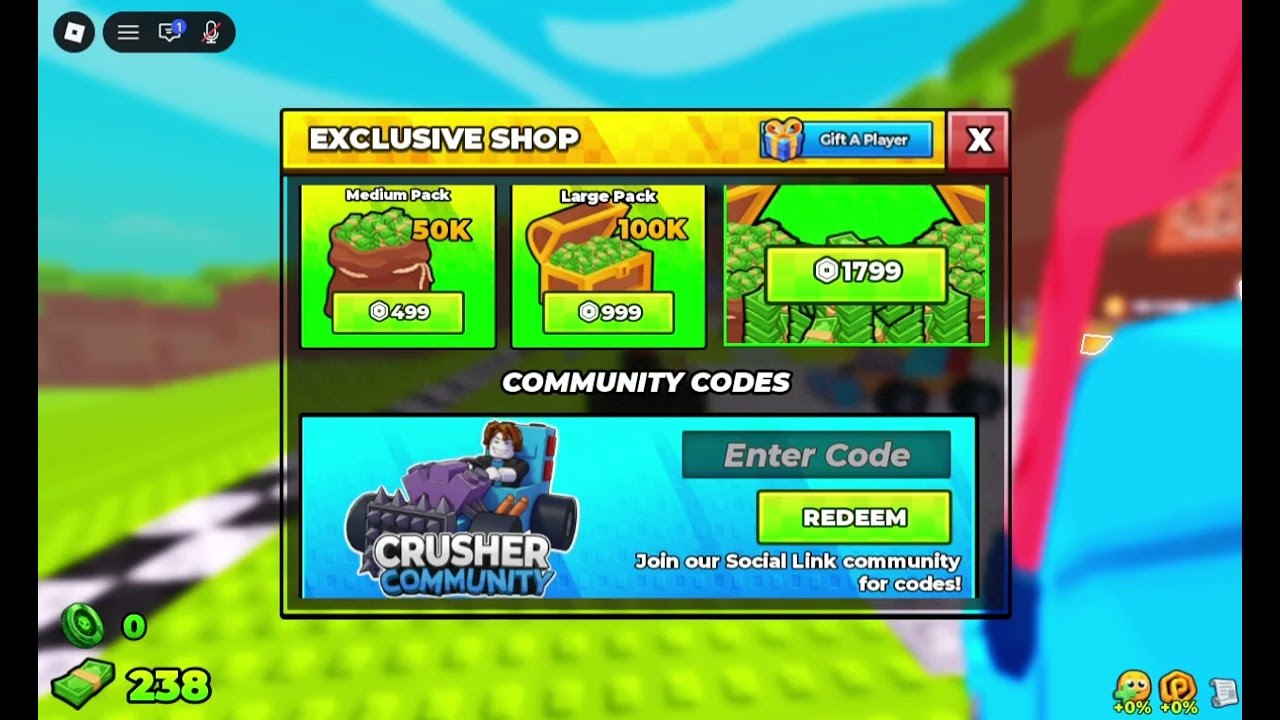
Redeeming in Build and Kill Zombies is a shop action, not a chat command. There is no /code box and no Roblox browser overlay. The control lives on the COMMUNITY CODES strip inside Exclusive Shop, the same panel that sells Medium and Large cash packs. If you learned codes from an older zombie-car title, throw that muscle memory out: checkpoint shops and delivery bricks belong to a different place ID.
This walkthrough assumes you can already walk the lobby pad. If the HUD still feels noisy, skim getting started first, then come back. Pair Redeem with the group chest so you do not leave free cash on the grass.
Step-by-step
- Join a public server from the Roblox experience page. Private or empty VIP instances sometimes lag shop replication.
- Stand on the lobby pad until Shop, Saves, Skills, and Co-Op finish loading on the left stack.
- Open SHOP. Exclusive Shop is the panel with the yellow header, Gift A Player, and the cash packs.
- Ignore the Robux rows (50K / 100K / 1799). Scroll to COMMUNITY CODES.
- Click Enter Code. Paste the string with no leading space and no extra punctuation.
- Press REDEEM. Watch the bill counter in the lower left. The green coin icon is a different currency.
- If nothing happens, leave and rejoin. Shop state can stick after a failed attempt.
What a good redeem looks like
A working string increments cash immediately. You do not get a full-screen fanfare. Check the bill stack, then open Car Parts before you Drive so the extra wallet is not sitting idle when a boss timer is already under 40 minutes. If you plan a rebuild, hit Saves first — Redeem does not snapshot the kart.
The helper caption on the strip says to join the social-link community. That is the intended drop channel. Group shouts from Zombie Car Crusher and the social-link tile on the Roblox page are the two places this wiki trusts. Random comment sections mix this game with Build a Car to Kill Zombies and will waste your Redeem cooldown.
Common failures
Expired. Codes for a launch weekend or a like-goal die without a toast. The Codes Hub moves dead strings into the expired table so you stop retrying them.
Wrong game. Strings that mention fuel canisters, delivery bricks, or Checkpoint 6 are for the older Jandel experience (place 117856377735280). They will never clear here.
Wrong currency expectation. Community Codes do not grant Robux, limited UGC, or the 1799 chest. Those are Exclusive Shop purchases. Codes grant in-game cash or a crate the HUD already knows how to display.
Typing. The field is case-sensitive in practice even when a video thumbnail shows lowercase. Paste once. Do not add a period from a Discord sentence.
Server. If three players redeem the same shout and only two get paid, hop. The shop remote is per-session.
After cash lands
Spend toward survival, not paint. The weapons tier list ranks plows and rollers that actually convert a Drive into distance. The build planner turns a 50K dump into a parts list so you do not impulse-buy Supports you cannot roll yet. If you still need a loop that prints cash without waiting on the next shout, use how to farm cash.
Co-op partners can redeem on the same server. Codes are per account, not per pad, so five players in a full server each need their own string entry. Do not stand in the Car Builder stall while someone else has Exclusive Shop open if you are on a potato mobile device — the UI stack fights for the same screen edge.
Mobile versus PC
On PC, Shop is a left-stack icon; Enter Code is a normal text field. On mobile, the yellow Redeem button sits under a software keyboard that can cover the bill counter. Dismiss the keyboard before you assume the redeem failed. Console players use the on-screen keyboard and should avoid trailing spaces from autocomplete.
Related pages
Keep updates open during event weeks. Hacker Event and Admin Abuse windows are when shouts usually land. The scripts hub documents auto-claim GUIs; using them can violate Roblox rules and is never required for a manual Redeem.
Frequently Asked Questions
Quick answers for lobby, Drive, codes, and boss timers.
Where is the code box in Build and Kill Zombies?
Inside Exclusive Shop, on the Community Codes strip, labeled Enter Code with a yellow Redeem button.
Do I redeem in chat?
No. There is no chat command. Use the shop field only.
Which counter should go up?
The bill / cash stack in the lower left. The green coin icon is separate and usually stays at zero after a cash code.
Can I redeem the same code twice?
Almost never. Codes are one redeem per account. A second attempt silently does nothing.