
Build and Kill Zombies How to Play Co-op
Online co-op is on the left stack. Five karts, one grass track, no shared wallet.
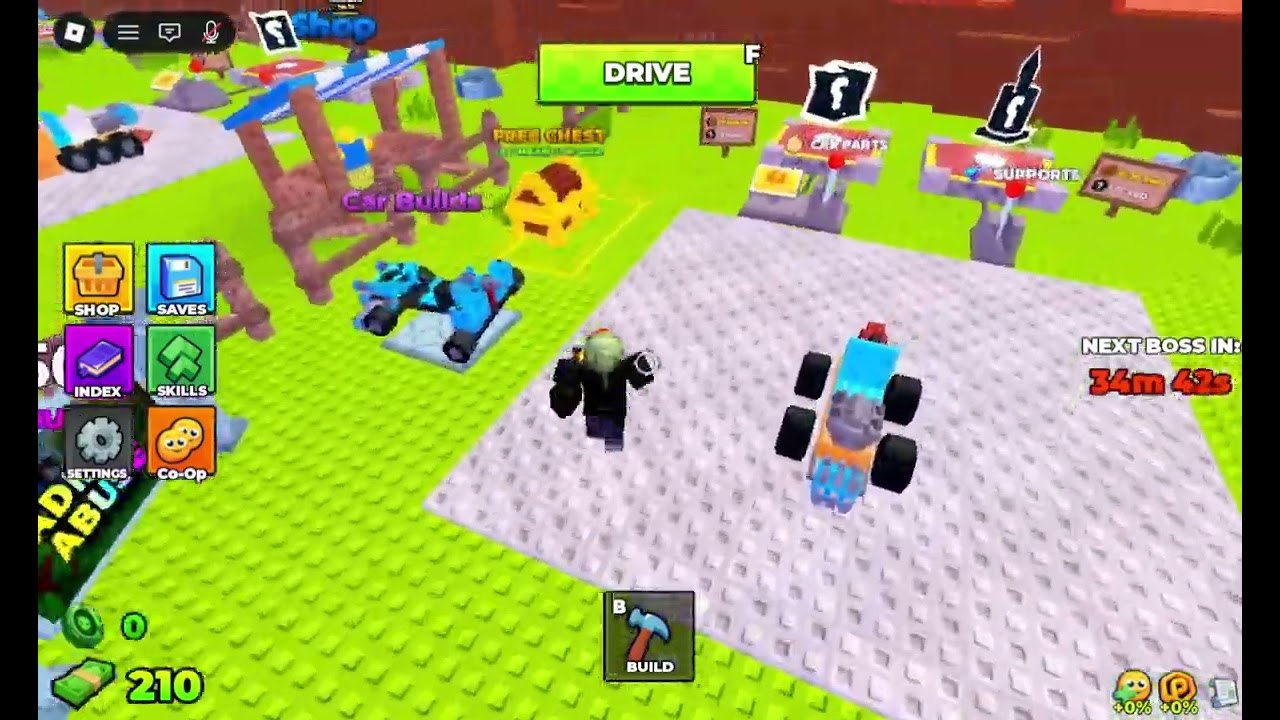
Build and Kill Zombies is an online co-op Roblox experience. The server cap is five. The sixth tile on the left stack is labeled Co-Op. That is not flavor. You can Drive a full pad of friends into the same zombie line, or you can ignore the tile and farm solo. This page is how the pad actually behaves when more than one account is loaded.
If you have not claimed cash yet, do codes and the group chest first. Co-op does not share bills.
What co-op is not
- Not split-screen on one client.
- Not a shared Save. Each account snapshots its own kart.
- Not a shared Exclusive Shop. Codes redeem per account.
- Not a merge of Skills trees.
- Not a way to claim someone else’s group chest.
It is five players on one grass track, hitting the same walkers, the same NEXT BOSS IN clock, and the same Admin Abuse board.
How to get in together
- One player opens the experience from the Roblox page.
- Friends join through the Roblox friends list / server list, or use the in-game Co-Op tile if it exposes an invite.
- Confirm you landed on the same pad. Different servers look identical: palms, checkered strip, FREE CHEST. Check usernames, not scenery.
- Do not stand inside someone else’s Car Builder stall. Build prompts overlap on mobile.
- Call lanes before the first Drive: left grass, center strip, right grass.
Private VIP servers are not enabled on this universe (createVipServersAllowed is false as of September 2026). You play public 5-max instances.
Roles that actually help
Copy mixed builds instead of five identical rollers:
- Roller — dense clusters past the strip.
- Wide bumper — stragglers and friend collisions.
- Needle — only after adds are thin; otherwise the seat dies.
Skills should match the Save. One contact node, one speed node, not five copies of the same first purchase. See skills.
Combat calls
When NEXT BOSS IN is under ten minutes, stop rolling Supports. Park facing the checkered strip. The boss guide and Hacker Event pages assume extra karts on King 1x1x1x1. If two friends ram the same walker while the King walks free, you lose the badge window.
During Admin Abuse, treat every contact as a boss contact. Keep a disposable Save. Do not Build (B) while the clock is at zero.
Etiquette on the pad
- Save before you Drive. A crash does not snapshot a friend’s kart for you.
- Do not edit another chassis unless they ask.
- PC players handle Shop and codes; mobile players ram. Shop + Build on a phone fights for the same edge.
- Auto-farm GUIs on a full pad will ram teammates. Say so or hop. Details on the scripts hub.
Mobile and console
Co-Op is usable on phones. The software keyboard still covers Redeem. Dismiss it before you assume a code failed. Console players use on-screen prompts for F/B. Jump is not turbo.
After a wipe
Repair HP pips before the next F. Do not dump a 50K pack into rolls because a friend just flashed 100K. Their wallet is not yours. The build planner still applies per account.
Co-op is the intended difficulty slider for this place. Use it for the King. Ignore it for short cash loops if your friends are not on. Either way, the HUD is built for five.
Frequently Asked Questions
Quick answers for lobby, Drive, codes, and boss timers.
Can we share one kart?
No. Each account builds and Saves its own chassis. You only share the grass and the boss clock.
Is there split-screen?
No. Online co-op means separate Roblox clients on one 5-player server.
Do VIP servers exist?
Not on this universe as of September 2026. Use public servers and the Co-Op tile.
Should all five players copy the same roller?
No. Mix a roller, a bumper, and maybe one needle so you do not compete for the same zombies.